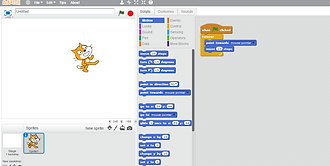
1. how to make the cat move forward 10 steps..
First get the block that says when green flag is clicked... that will set it so that when you hit the little green flag in he corner of the screen the animation will start.
Next get the block that says move__steps. once you have got that block you need to type in the little box ,the one that is in between move and steps, 10.
Finally click the green flag and watch your animation come to life


2. how to make the cat do a 360 turn..
First get the block called the when green flag clicked.. and drag it into place.
Next get the forever block. then put the block called the turn 15 degrees block into the forever block.
After that press the green flag in the corner of your screen.
if you want to make the cat move faster put a second turn 15 degrees block in and it will go twice the speed.
3. make the cat point in the direction of the mouse pointer while moving.
First get the green flag button then get the forever block and place it below.
Next get the point towards mouse pointer block and put it inside the forever block. then put the move ten steps below the point towards mouse pointer block but still inside the forever block.
Finally press the green flag and easily control were the cat goes!